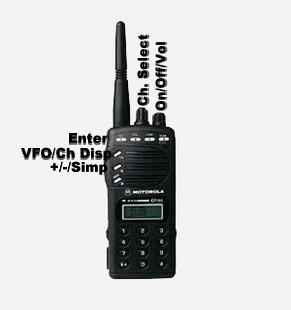
The Motorola GP-68 is available in both VHF and UHF. This particular radio is UHF. Both program the same. While manufacturer programming information is confusing, here is a quick, simple set of instructions to follow for successful programming. Use the provided picture above while performing the steps below.
TO PROGRAM YOUR RADIO
Step 1 Turn on the radio by way of the ON/OFF/VOL knob.
Step 2 Press the VFO/DISP button so the frequency is displayed. Disregard this step is frequency is already displayed.
Step 3 Enter the desired frequency. Step 4 Press the +/-/SIMP button to select the desired offset.
Step 5 Press and hold the SQL B button until the radio beeps. This will display the RECEIVE PL. Select the desired RECEIVE PL, if desired, by turning the CH SELCT KNOB.
Step 6 Momentarily press the SQL B button again. The display will show the transmit PL. Select the desired transmit PL by turning the CH SELECT knob.
Step 7 Wait a few seconds for the display to return to the frequency mode. At this time press and hold the ENTER button until the radio beeps.
Step 8 Rotate the selector knob to the desired memory channel.
Step 9 Momentarily press the select button one more time.
You have now saved your settings to the desired channel. Repeat the steps above for the remaining 19 channels. Below, plesase find a FREE PDF user manual for this radio.
NOTE: SETTING THE PL CODE
When in the PL mode, you will notice a number, opposed to the actual PL tone. See the chart below to match the radio's PL number to the actual PL tone.